
/ Wi-Fi & Network Installation Toowoomba
Wi-Fi & Network Installation Toowoomba
Reliable Wi-Fi is no longer a convenience—it's essential infrastructure.
Cadence Systems designs and installs professional Wi-Fi and network solutions throughout Toowoomba and the Darling Downs, providing reliable wireless coverage for homes, offices, commercial buildings, warehouses, workshops, hospitality venues and rural properties.
If you're experiencing Wi-Fi dead zones, unreliable connections, poor outdoor coverage or a network that simply can't keep up with the number of connected devices, we can assess your existing infrastructure and design a solution around the property rather than simply adding another wireless extender.
Modern Wi-Fi performs best when it is properly designed. Building construction, floor layout, access point placement, interference, network configuration and the number of connected devices can all have a significant effect on performance.
We install professional network solutions using quality equipment from manufacturers including Ubiquiti UniFi, with wired access points strategically positioned throughout the property to provide consistent coverage and reliable connectivity.
From improving Wi-Fi in a family home to deploying multiple access points across a commercial facility or connecting remote buildings across a rural property, Cadence Systems can provide a complete solution incorporating network cabling, switching, wireless infrastructure and remote management.
Servicing Toowoomba, Highfields, Oakey, Warwick, Dalby, Gatton, Pittsworth and the wider Darling Downs.
Tired of unreliable Wi-Fi?
Contact Cadence Systems to discuss your property and arrange an obligation-free consultation.


■ Why Choose Cadence Systems?
Installing professional Wi-Fi requires more than mounting access points.
The network behind those access points is equally important.
Our experience across:
Structured cabling
Network switching
Wi-Fi
Fibre
CCTV
Access control
Intercoms
Allows us to design complete infrastructure rather than treating each technology as a separate system.
When you choose Cadence Systems, you receive:
Professional network design
Quality equipment
Neat installation
Wired access points wherever practical
Scalable solutions
Practical advice
Remote management options
Security system integration
Ongoing support


* Professional Wi-Fi Installation
More Than Just Adding Another Access Point
Good Wi-Fi starts with good design.
Simply installing additional access points or wireless extenders doesn't necessarily improve a network. Poor placement can create interference, roaming problems and inconsistent performance.
We consider:
Property size and layout
Building construction
Existing network infrastructure
Number of connected devices
Indoor and outdoor coverage requirements
The result is a network designed around how your property is actually used.
Internet connection speed
Network congestion
Access point placement
Wired backhaul
Future expansion





+ CCTV Brands We Install
Cadence Systems supplies and installs trusted industry-leading brands including but not limited to:
Ubiquiti
Ubiquiti Unifi
Ruijie Reyee
We recommend equipment based on reliability, support and suitability for your application—not simply the lowest purchase price.
Wi-tek Wireless
NightHawk
< Our Installation Process
1. Consultation
We discuss the problems you're experiencing and how the network is used.
2. Site Inspection
We assess the property, existing network infrastructure and areas requiring coverage.
3. Network Design
We determine suitable access point locations, switching requirements and cabling infrastructure.
4. Professional Installation
Network cabling, switches and wireless access points are professionally installed.
5. Commissioning
The network is configured for reliable performance, security and appropriate device separation.
6. Customer Training
Coverage and connectivity are tested, and we'll explain how your new network operates.


+ Wi-Fi Troubleshooting & Network Upgrades
Already have a network that doesn't perform properly?
We can assess existing installations and identify potential causes of poor performance.
Common issues include:
Poor access point placement
Too few access points
Too many access points
Wireless interference
Incorrect channel configuration
Weak signal
In many cases, improving the existing design can provide better results than simply adding more equipment.
Poor roaming
Wireless mesh bottlenecks
Outdated equipment
Inadequate switching
Poor network cabling


= Systsems
Residential Wi-Fi
Reliable Coverage Throughout Your Home
The basic Wi-Fi router supplied with an internet connection may be adequate for a small property, but larger homes can quickly expose its limitations.
Common problems include:
Bedrooms with poor signal
Slow streaming
Video calls dropping out
Weak coverage upstairs
Poor coverage in garages and sheds
Smart devices disconnecting
Outdoor areas without reliable Wi-Fi
Inconsistent performance between rooms
Rather than relying on repeaters, we can install strategically located wired wireless access points throughout the property.
A properly designed residential network can provide reliable connectivity for:
Phones and tablets
Smart TVs
Streaming devices
Home offices
Gaming
CCTV systems
Intercoms
Smart home devices
IoT equipment
Outdoor entertainment areas
Commercial Wi-Fi
Wireless Infrastructure Designed for Business
Commercial networks have very different requirements from typical residential Wi-Fi.
A business may have dozens or hundreds of devices connected simultaneously while relying on the network for communications, cloud applications, security systems and daily operations.
We design Wi-Fi solutions for:
Offices
Retail stores
Warehouses
Medical centres
Schools
Hospitality venues
Workshops
Industrial facilities
Apartment common areas
Commercial properties
Commercial networks can include:
Multiple wireless access points
Centralised network management
Separate staff and guest networks
VLAN configuration
Guest Wi-Fi
Bandwidth management
PoE switching
Remote monitoring
Outdoor wireless coverage
Network security configuration
Ubiquiti UniFi Installation
Professional UniFi Networks
Cadence Systems specialises in the installation and configuration of Ubiquiti UniFi networking equipment.
UniFi provides a scalable networking platform suitable for residential, commercial and multi-site environments.
A UniFi network can incorporate:
UniFi gateways
Network controllers
Managed switches
PoE switches
Indoor Wi-Fi access points
Outdoor access points
Wireless bridges
CCTV through UniFi Protect
Remote network management
One of the advantages of UniFi is the ability to manage the network through a central interface, providing visibility of connected devices, access point performance, network traffic and system health.
UniFi systems can range from a simple residential network through to larger commercial deployments with multiple switches and wireless access points.
Indoor Wi-Fi Coverage
Access point placement has a significant impact on wireless performance.
Installing a powerful access point in one corner of a building is often less effective than installing several appropriately positioned access points operating at sensible power levels.
We consider factors including:
Walls and building materials
Floor levels
Device density
Interference
Ceiling height
Room layout
Coverage overlap
Roaming requirements
Where possible, access points are connected using dedicated network cabling rather than relying on wireless mesh connections.
This provides a stable wired connection between the access point and the network.
Rural & Acreage Wi-Fi
Large properties present unique networking challenges.
A single residential router is unlikely to provide reliable coverage across a house, workshop, shed and surrounding property.
Cadence Systems can design network infrastructure incorporating:
Indoor Wi-Fi
Outdoor Wi-Fi
Point-to-point wireless links
Fibre optic links
Underground network cabling
Remote switches
Multiple access points
CCTV connectivity
Gate intercom connectivity
Remote IoT devices
This allows multiple buildings and outdoor areas to operate as part of a single managed network.
Outdoor Wi-Fi
Extend Reliable Connectivity Beyond the Building
Wi-Fi requirements often extend beyond the walls of a property.
We can design outdoor wireless coverage for:
Patios
Pools
Gardens
Workshops
Sheds
Loading areas
Car parks
Storage yards
Rural properties
Outdoor equipment
Irrigation controllers
IoT devices
Purpose-built outdoor access points provide greater durability and more appropriate coverage than attempting to extend an indoor wireless network through exterior walls.
Point-to-Point Wireless Links
Connect Buildings Without Running a Cable
Where installing fibre or network cabling between buildings is impractical, a wireless bridge may provide an excellent alternative.
Point-to-point wireless systems create a dedicated network connection between two locations.
Common applications include:
House to shed
Office to warehouse
Building to gate
Workshop to office
CCTV at remote buildings
Rural properties
Commercial campuses
When properly designed with suitable line of sight, these links can provide high-speed and reliable connectivity across considerable distances.
Guest Wi-Fi Networks
Businesses offering Wi-Fi to customers or visitors should generally keep guest devices separated from internal business systems.
We can configure dedicated guest wireless networks for:
Cafes
Restaurants
Offices
Medical facilities
Accommodation
Retail stores
Waiting rooms
Guest networks can be isolated from internal equipment while still providing visitors with internet access.
Wi-Fi for CCTV & Security Systems
Our background in both networking and electronic security provides an important advantage when designing connected security systems.
Modern:
CCTV cameras
Access control systems
Video intercoms
Alarm systems
Gate controllers
may require network connectivity.
We can design the security system and underlying network together rather than relying on separate contractors to make the systems work after installation.
This can include:
PoE switching
VLAN configuration
Remote access
Wireless links
Fibre links
Outdoor connectivity
UPS backup
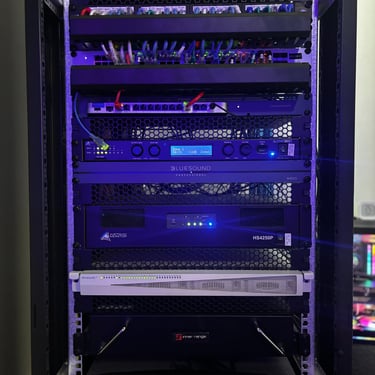
Communications racks
Network Segmentation & VLANs
Larger networks often benefit from separating different types of devices.
For example, a commercial network might contain:
Business computers
Staff Wi-Fi
Guest Wi-Fi
CCTV cameras
Access control
Intercoms
IoT devices
Rather than placing everything onto the same network, VLANs can be used to logically separate devices while still using common network infrastructure.
This can improve security, management and network organisation.


- Frequently Asked Questions
Why is my Wi-Fi signal poor in parts of my house?
> Distance, walls, building materials, interference and access point placement can all reduce wireless performance. Large or multi-story homes will often perform better with several properly positioned access points rather than relying on a single router.
Are Wi-Fi extenders a good solution?
> They can be useful in some situations, but they're not our preferred solution for a permanent professional installation. Where practical, we prefer wired access points connected directly back to the network.
Is mesh Wi-Fi the same as having multiple access points?
> Not necessarily. Many consumer mesh systems communicate between access points wirelessly. Professional systems can use Ethernet cabling to provide wired backhaul, reducing reliance on the wireless connection between access points.
How many Wi-Fi access points do I need?
> There is no universal answer. It depends on the property's size, layout, construction and required coverage. More access points aren't automatically better—proper placement and configuration are equally important.
Can you improve Wi-Fi in my shed or workshop?
> Yes. Depending on the distance and existing infrastructure, we may use network cabling, fibre or a point-to-point wireless bridge to extend the network to another building.
Can you provide outdoor Wi-Fi?
> Yes. We install purpose-built outdoor wireless access points for yards, outdoor entertainment areas, workshops, rural properties and commercial facilities.
Do you install Ubiquiti UniFi?
> Yes. Cadence Systems installs and configures Ubiquiti UniFi networking equipment for residential and commercial applications. This is out preferred brand and range.
Can you use my existing NBN connection?
> Yes. In most installations your existing internet service can remain in place while we improve the network that distributes that connection around the property.
Can you connect remote CCTV cameras wirelessly?
> Yes. Where appropriate, point-to-point wireless links can be used to extend network connectivity to remote buildings or locations.
~ Recent Project Types
Our experience includes surveillance installations across:
Commercial offices
Retail stores
Residential properties
Apartment complexes
Warehouses
Industrial facilities
Schools
Rural properties


- Related Services
Looking for a complete building security solution?
Cadence Systems also provides:
CCTV Installation
Access Control Systems
Intercom Systems
FOB, Cards, and Remotes
Alarm Systems
Data Cabling
System Maintenance
/ Wi-Fi Installation Toowoomba & Darling Downs
Whether you're struggling with Wi-Fi dead zones at home, need reliable connectivity throughout a commercial building or want to connect multiple buildings across a rural property, Cadence Systems can design a network around your requirements.
We provide professional Wi-Fi and network solutions throughout Toowoomba and the Darling Downs, combining quality equipment with properly designed network infrastructure.
Ready for Wi-Fi that actually works?
Contact Cadence Systems today to discuss your network and arrange an obligation-free consultation.